
How to Redeem Fast Lifting Simulator Codes
Find the Codes control, paste once, then sell during the boost.
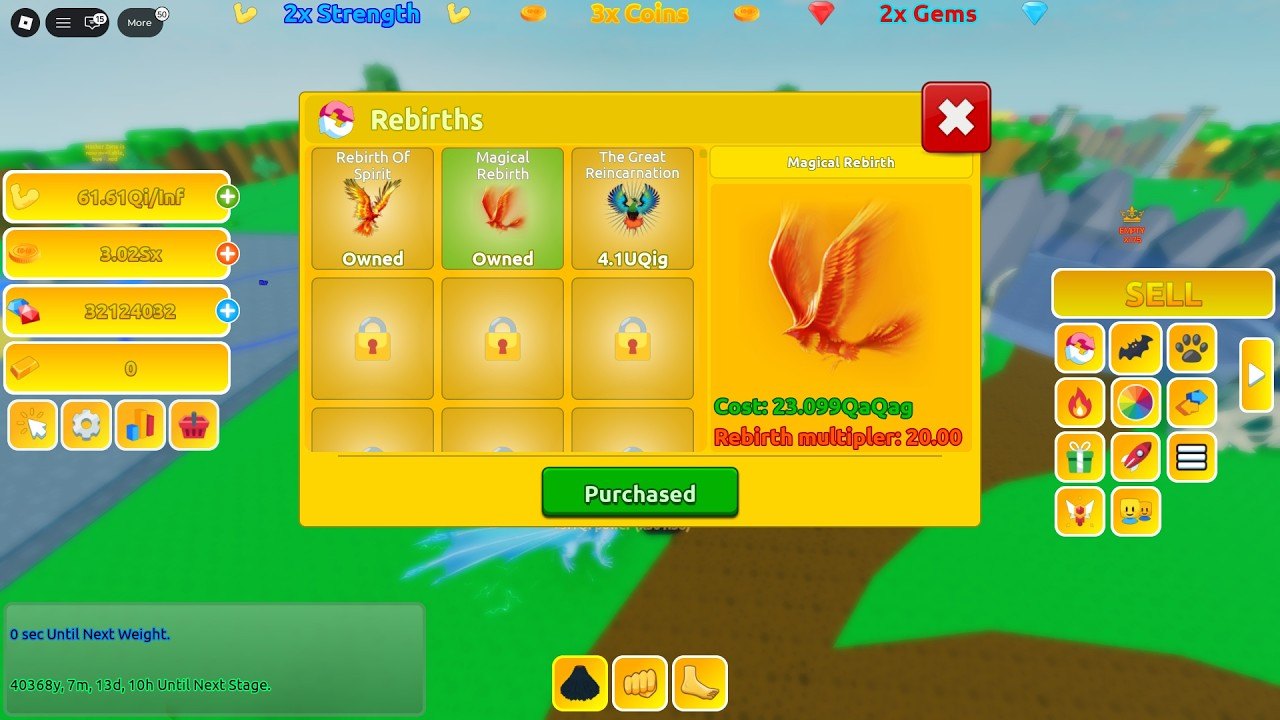
Redeeming a Fast Lifting Simulator code takes under a minute once you know which HUD cluster InfCube uses. The gym is crowded on x2 weekends, the Codes button sits next to settings, and console players now have their own layout after the [CONSOLE] rename. This page is the practical walkthrough that sits under the codes hub.
If you just joined, finish one lift-and-sell loop from the beginner guide first. A code that grants x3 Coins is wasted if you have not found Sell yet.
PC and mobile steps
- Launch Fast Lifting Simulator — place 88503041003371, not the 2022 clone.
- Wait until the left currency stack appears: Strength, Coins, Gems, and the gold-bar row.
- On the left, under those meters, tap the gift / Codes control. It sits with settings (gear) and the shop basket.
- Type the string exactly. Codes in InfCube gyms are case-sensitive. Do not add spaces before or after.
- Press Redeem / Enter. A toast will confirm Coins, Strength time, Gems, or a boost chip on the top banner.
- If the reward is a multiplier, do not teleport randomly. Walk or sit on your current weight and lift through the timer, then hit Sell.
On a phone, rotate to landscape if the Codes panel clips behind the pet grid. The right-side pet tray and the yellow Sell button can eat taps. Close the Rebirths window first if you opened it — the modal blocks the Codes field.
Console steps
The September 2026 console update added pad navigation. Open the experience on Xbox or PlayStation, highlight the left HUD with the stick, and select the same Codes control. Use the on-screen keyboard. Avoid copying from a second device with a trailing newline; the remote treats that as a different string.
If the virtual keyboard covers Redeem, close it, then press the on-screen confirm. One failed submit does not burn the code. Try again on a fresh server if the first hop was a leftover [SEASON 3] instance that never received the console remote.
What success looks like
A good redeem changes one of four HUD surfaces:
- Coin or Strength number jumps immediately.
- Top event banner adds another multiplier (x2 Coins, x3 Strength, x3 Gems). These stack with the weekly x2 weekend.
- Gems tick up — spend them on pets, not on impulse weights.
- A timed chip appears near the existing event labels. Watch the timer before you rebirth.
If nothing changes, the string is expired, typed wrong, or bound to a like/favorite gate. Favorite the experience and join the InfCube group, then redeem again. Some InfCube titles require group membership for the newest code.
Failure cases that are not your fault
Invalid after a prefix change means InfCube retired the last batch. Check Season 3 notes and the group shout.
Already redeemed is account-wide. Alts do not share codes, but the same account on console and PC does.
No Codes button usually means the Rebirths, Shop, or pet modal is open. Close every yellow panel. On very first spawn, wait until “You are safe!” appears — the tutorial lock hides extras.
Works for a friend, not you. They are on a different place file. Confirm the universe is 10070351442. The older Fast Lifting Simulator still exists and will happily eat a new-game string and return invalid.
After you redeem
- Read the top banner. If Coins is the boosted stat, grind then Sell. If Strength is boosted, stay on the heaviest weight you can click without stalling the “Until Next Weight” timer.
- If you are one tile from Rebirth Of Spirit or Magical Rebirth, sell during the stack, then buy the rank while the chip is live.
- Do not run a script that auto-redeems random lists. Bad lists trigger remote spam and can stall the Codes endpoint for your session.
- Screenshot a successful toast if you report a new string on Discord so other players can verify it.
Mobile and performance tips
Low-end phones drop HUD buttons when the pet grid is full. Unequip extra pets from the right tray, redeem, then re-slot your S-tier pets. During x4 Coins events the banner grows and can cover the Codes icon — swipe the top edge or open settings first, then Codes.
If the game is in a 25-player packed server, hop once after redeeming. Packed servers delay Sell and make it look like the code “did nothing” because Coins take a second to replicate.
For the current drop pattern and what rewards usually contain, return to the codes hub. Pair this page with how to play so the boost lands on a real lift, not on an empty backpack.
Frequently Asked Questions
Quick answers for Fast Lifting Simulator on Roblox.
Where is the Codes button?
Left HUD, under Strength / Coins / Gems, beside the gear and shop icons. Close the Rebirths modal if you cannot tap it.
Are Fast Lifting Simulator codes case-sensitive?
Yes. Paste exactly. A trailing space from a phone keyboard is the most common fail.
Can I redeem on console?
Yes after the [CONSOLE] patch. Use the on-screen keyboard and avoid extra line breaks. See console notes.
Should I redeem before or after a rebirth?
Redeem first, sell during the boost, then buy Rebirth Of Spirit so the x5 multiplier sits on the new rank.